Is Microsoft 365 sufficient to protect corporate data?
Understand the platform's limitations, the real risks, and why external backup is essential to ensure data recovery.
According to Statista data , more than 345 million active users utilize Microsoft 365 daily. For many of these companies, M365 has become the center of operations: emails, documents, meetings, internal communication, and critical files.
In this context, it's common for managers to assume that their data is automatically protected within this ecosystem. But there's a fundamental difference: ensuring the service is available is one thing; guaranteeing that the data is never lost is quite another.
Microsoft 365 was designed for the first scenario and delivers on it consistently. With redundant infrastructure, a 99,9% uptime SLA, and high resilience, the platform ensures service continuity.
However, protection against data loss caused by accidental deletions, attacks, or operational errors is not included in this delivery. In this case, the responsibility lies with the customer and requires an additional layer of protection, as Microsoft itself recommends in its official documentation.
In this article, you will understand the real limitations of Microsoft 365's native protection, in which scenarios data can be permanently lost, and what your company needs to implement to ensure secure recovery and business continuity.
What security features does Microsoft 365 offer in practice?
Microsoft 365 includes a robust set of features aimed at protecting the platform. Below, we detail the four main pillars of this protection and what each one effectively covers within the Microsoft ecosystem:
Protection against external threats
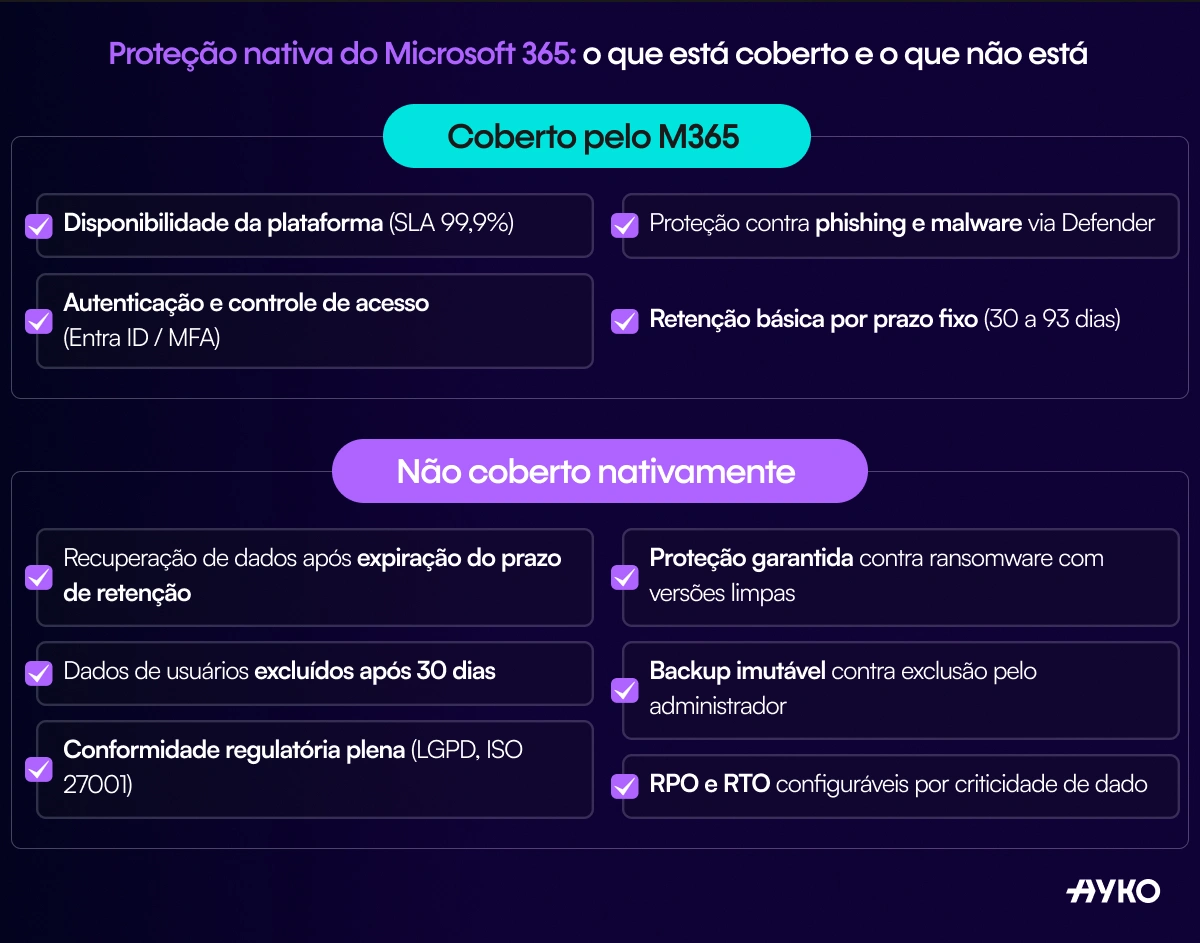
Microsoft Defender monitors emails for phishing, malware, and malicious links. Microsoft Entra ID (formerly Azure AD) manages identity and access, supporting multi-factor authentication. These are robust perimeter protection features.
Availability and redundancy of infrastructure
Microsoft maintains a 99,9% uptime SLA for M365 services, meaning the platform rarely goes down. This redundancy protects against Microsoft's own failures, not against what happens to the data within your company's account.
Native retention with a fixed term.
M365 offers recycle bins and recovery windows: up to 30 days for emails and up to 93 days for files on OneDrive and SharePoint. After these periods, without additional configuration, the data is permanently deleted.
Microsoft Purview for compliance
Available in the E3 and E5 plans , Purview allows you to create retention policies, perform searches, and manage regulatory requirements. It's a powerful tool, but it relies on active configuration, technical knowledge, and proper licensing, and it doesn't work automatically.
In other words, Microsoft guarantees that the environment will function, but not that the data will be protected against loss. This is clear in the shared responsibility model, where protecting the infrastructure is Microsoft's responsibility, while protecting the data is the client's responsibility.
Want to delve deeper into the topic? Read also: How to protect your company's data in the cloud and avoid critical losses?
What does Microsoft 365 not protect against?
Microsoft 365's native features offer good protection against external threats and platform vulnerabilities, but there are internal and operational scenarios that fall outside the reach of this protection. Learn about the main points of exposure.
Accidental or malicious exclusion
If a collaborator deletes an entire folder or an administrator removes an account without exporting the data, recovery is only possible within the native retention windows. Outside of this period, the data is permanently lost. There is no way to contact Microsoft to recover what has been lost.
Ransomware that acts within the retention period.
Defender can detect attacks, but it doesn't prevent encrypted files from overwriting previous versions in OneDrive before any alert is triggered. If the attack acts quickly enough, the "clean" versions available for restoration may no longer exist.
Data on former employees after 30 days.
When an account is deleted, the data remains accessible for 30 days. After this period, it is permanently removed unless a retention policy has been previously configured. Companies with high turnover are constantly exposed to this risk.
Data corruption due to synchronization errors.
OneDrive syncs files across devices. When a corrupted file is synced, it overwrites the correct version on all connected devices. Detection isn't always immediate, and version history has a time limit.
Full regulatory compliance
The LGPD (Brazilian General Data Protection Law) requires control over where the data is located, who accessed it, how long it will be retained, and how it will be deleted. M365 offers partial tools for this, but without specialized configuration and an auditable backup solution, full compliance is not guaranteed.
The shared responsibility model in practice.
The shared responsibility model is an implicit agreement present in any cloud service contract, whether AWS, Google Workspace, or Microsoft 365. It defines the limits of the provider's obligation and the client's, establishing that both parties have distinct roles in ensuring the security of the environment. The logic is simple:
- The provider is responsible for infrastructure, availability and security the platform.
- The client is responsible for data which is placed within that platform.
The problem is that this model is rarely clearly communicated at the time of hiring. Most companies only discover this division of responsibilities after an incident.
According to Gartner , 99% of cloud security breaches are attributed to the customer , not the provider. This data highlights an important shift in how security should be approached within companies.
In practice, this happens because, although providers like Microsoft guarantee the security of the infrastructure and platform, the configuration, use, and protection of data remain the responsibility of those who use the environment.
Which M365 plans offer the most protection?
Not all Microsoft 365 plans deliver the same level of protection. There are significant differences between the versions available on the market, especially when it comes to data retention, regulatory compliance, and incident response. Understanding what each plan covers is essential to assess whether your company's current licensing is adequate for the risk it faces.
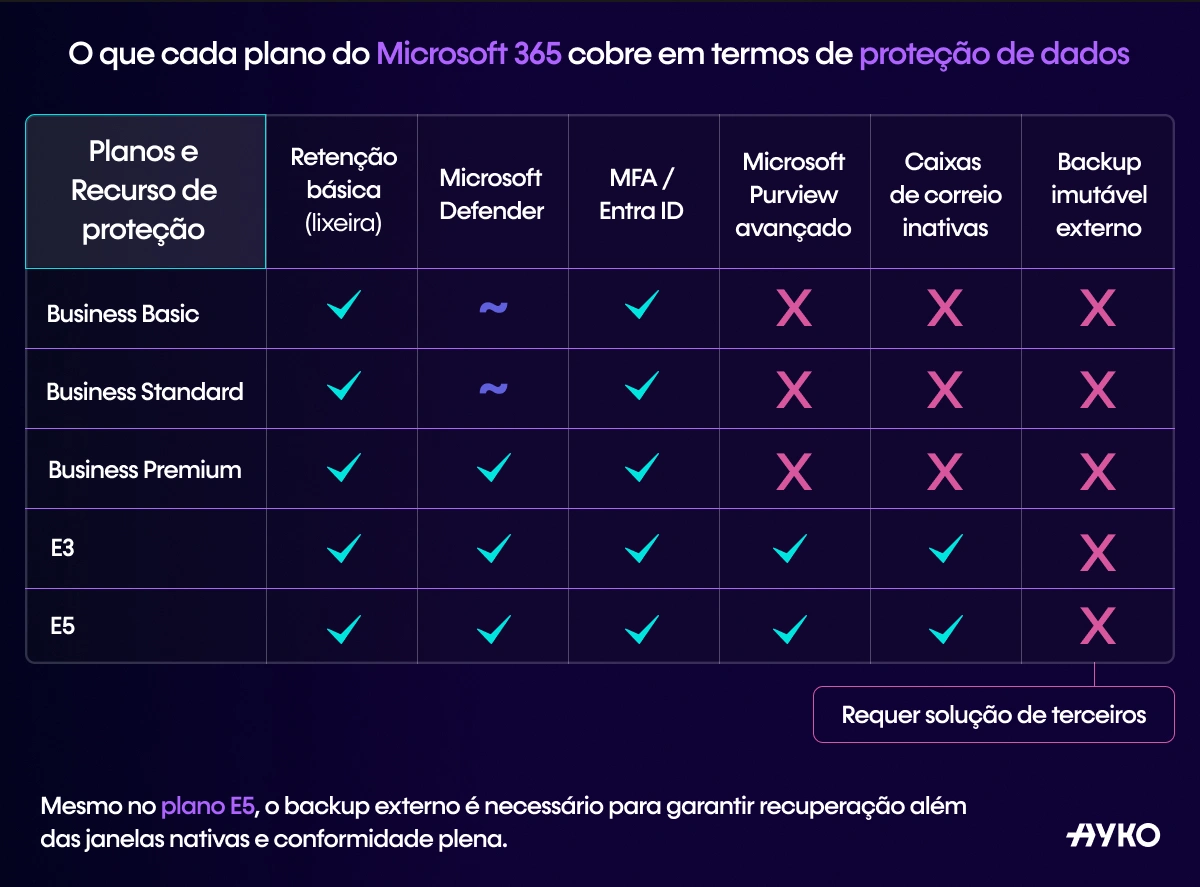
Microsoft 365 Business Basic / Business Standard
Standard retention (30 to 93 days), without access to advanced Microsoft Purview. Suitable for companies with low data criticality and no specific regulatory requirements.
Microsoft 365 Business Premium
Includes Microsoft Defender for Business and additional endpoint security features. Still lacks Purview's advanced compliance and retention tools.
Microsoft 365 E3
First plan with full access to Microsoft Purview, bringing together advanced retention policies, eDiscovery features, and inactive mailbox management. Suitable for companies with higher compliance and data governance requirements.
Microsoft 365 E5
The most comprehensive plan, with advanced threat protection, compliance, and security analytics. Even so, it doesn't replace a dedicated external backup; it only reduces the window of exposure.
Regardless of the plan, no version of Microsoft 365 offers immutable backup, configurable RPO, or recovery guarantees beyond the native retention windows.
Why does your company need external backup in Microsoft 365?
Microsoft 365 is a productivity platform designed to keep teams connected, files accessible, and communication flowing. Off-site backup, on the other hand, is a data protection solution developed to ensure that this information can be recovered in any loss scenario, regardless of the timeframe or cause.
These are layers with distinct and equally necessary purposes: while M365 ensures the environment functions, the external backup guarantees that the data exists even when something goes wrong within it.
The main practical benefits are:
- Recovery beyond native deadlines: The backup history is maintained for as long as the company defines, without depending on Microsoft's fixed windows. Data that would be automatically deleted remains accessible and recoverable.
- Immutable backup: The copies cannot be deleted or altered by any user, not even the administrator, and remain intact even if the M365 environment is compromised by an attack.
- Configurable RPO: The backup frequency is no longer a fixed platform standard but is defined according to the criticality of each data type, adapting protection to the actual operational needs.
- Granular recovery: It's possible to restore a single email, file, or conversation without having to recover an entire environment, reducing the time and impact of any interruption.
- Audit and compliance: Detailed access and retrieval logs provide the traceability necessary to comply with the LGPD (Brazilian General Data Protection Law) and certifications such as ISO 27001.
- Protection against account deletion: Data from departing employees is preserved regardless of native retention periods, eliminating one of the main points of silent exposure in the Microsoft 365 environment.
According to Veeam's Data Protection Trends Report , 34% of companies that suffered data loss in SaaS environments like M365 were unable to recover everything , and the main reason was the absence of external backups.
Frequently asked questions about data protection in Microsoft 365
Data protection in Microsoft 365 often creates a perception of security that doesn't always match operational reality. Therefore, we've compiled the most frequently asked questions from IT teams and leadership to clarify the platform's limitations and show what truly needs to be considered in a corporate data protection strategy.
- Does Microsoft 365 automatically back up my data?
Not in the traditional sense. Microsoft maintains infrastructure redundancy to ensure availability, but does not perform backups for the purpose of data recovery by the customer. Recycle bins and version history are temporary retention features, not corporate backups.
- If I pay for the most expensive M365 plan, is my data fully protected?
No. Even the E5 plan does not offer immutable backup, configurable RPO, or guaranteed recovery beyond the native retention windows. The E5 plan enhances security and compliance features, but does not eliminate the need for external backup.
- Can Microsoft recover my data if I request support?
In most cases, no. Once the native retention period expires, the data is permanently removed from Microsoft servers. Support can help in specific cases within the retention period, but does not have access to data that has already been permanently deleted.
- My company is small. Do I still need an external backup for M365?
Size isn't the deciding factor; criticality is. If your company relies on data in M365 to operate, generate revenue, or serve customers, the risk exists regardless of size. An accidental deletion in an SME can be just as impactful as in a large corporation.
Your company deserves more than the standard.
Microsoft 365 is an excellent platform, and for that very reason, it concentrates data that is increasingly critical to business operations. Precisely for this reason, relying solely on the platform's native protection is a risk not worth taking.
With 22 years of experience in information security, infrastructure, and business continuity, Ayko implements dedicated backup solutions for Microsoft 365 environments, covering what the platform doesn't, with complete visibility, compliance, and guaranteed recovery within your business's RPO and RTO.
Speak with an Ayko specialist and discover what's uncovered in your Microsoft 365 environment today.